April 19, 2026
In the highly competitive world of eCommerce, product images are often the deciding factor between a sale and a missed opportunity. For sellers on Amazon, high-quality images are not just recommended—they are essential. Amazon has strict image guidelines designed to create a consistent shopping experience, and failing to meet these standards can lead to suppressed listings or lost conversions.
This complete guide to Amazon product image requirements will help eCommerce sellers, photographers, and agencies understand exactly how to optimize product visuals for better visibility, compliance, and sales performance.
Why Amazon Product Images Matter
Amazon is a visual-first marketplace. Customers cannot physically touch or test products, so images act as the primary source of information. High-quality images:
Simply put, better images lead to higher sales.
Amazon Main Image Requirements
The main image (also known as the “hero image”) is the most critical visual element of your listing. It is the first thing customers see in search results.

Key Requirements:
Technical Specifications:
Best Practices:
Additional Image Guidelines
Amazon allows up to 9 images (including the main image), and these additional images provide an opportunity to showcase features and benefits.
Types of Additional Images:
1. Lifestyle Images
Show the product in real-life scenarios. These images help customers visualize how the product fits into their lives.
Tips:
2. Infographic Images
Highlight key features, dimensions, and benefits using text and graphics.
Tips:
3. Close-Up Shots
Provide detailed views of textures, materials, and craftsmanship.
4. Multiple Angles
Show the product from different perspectives to eliminate buyer uncertainty.
5. Packaging Images
Display what the customer will receive, including packaging and included accessories.
Amazon Image Do’s and Don’ts
Do’s:
Don’ts:

Importance of Image Optimization for SEO
While images themselves are not indexed in the same way as text, they still play a crucial role in Amazon SEO.
How Images Impact SEO:
Optimization Tips:
Role of Professional Image Editing
Raw images rarely meet Amazon’s standards without editing. This is where professional image editing services become essential.
Common Editing Services:
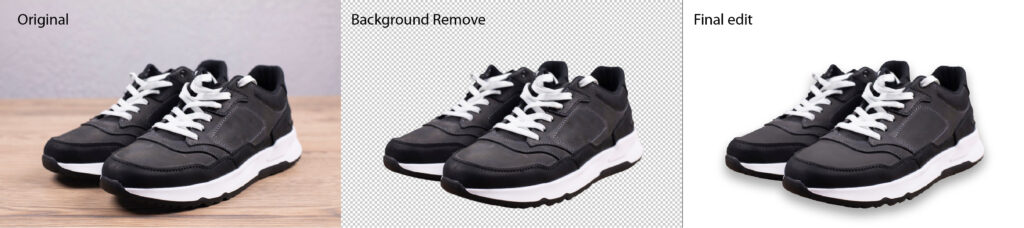
Professional editing ensures compliance with Amazon guidelines while enhancing visual appeal.
Image Compliance and Listing Suppression
Amazon uses automated systems and manual reviews to enforce image guidelines. Non-compliant images can result in:
Common Reasons for Rejection:
Regular audits of your listings can help avoid these issues.
Mobile Optimization for Amazon Images
A large portion of Amazon shoppers use mobile devices. This makes mobile optimization critical.
Tips for Mobile-Friendly Images:
Image Strategy for Higher Conversions
To maximize conversions, your image set should tell a complete story.
Suggested Image Sequence:
This structured approach guides the customer from awareness to purchase.
Tools and Equipment for High-Quality Images
For photographers and agencies, investing in the right tools can significantly improve output quality.
Recommended Equipment:
Benefits of Outsourcing Image Editing
For high-volume sellers and agencies, outsourcing image editing can save time and improve consistency.

Advantages:
Websites like clippingimages.com specialize in providing high-quality image editing services tailored for eCommerce platforms like Amazon.
Common Mistakes to Avoid
Even experienced sellers make mistakes that can hurt performance.
Top Mistakes:
Future Trends in Amazon Product Images
The eCommerce landscape is evolving, and so are image expectations.
Emerging Trends:

Staying ahead of these trends can give sellers a competitive edge.
Final Thoughts
Amazon product images are more than just visuals—they are a powerful sales tool. By understanding and following Amazon’s image requirements, sellers can improve visibility, build trust, and increase conversions.
Whether you are an individual seller, a professional photographer, or a digital agency, investing in high-quality, optimized images is one of the most effective ways to grow your Amazon business.
If you want to ensure your images meet Amazon standards and stand out in a crowded marketplace, consider partnering with a professional image editing service like clippingimages.com.
FAQs
What is the ideal image size for Amazon?
At least 1000 x 1000 pixels, but 2000 x 2000 pixels is recommended for zoom functionality.
Can I use text in Amazon product images?
Text is not allowed in the main image but can be used in additional images.
Why is a white background required?
It ensures consistency across the platform and keeps the focus on the product.
How many images should I upload?
Use all available slots (up to 9) to fully showcase your product.
By following this complete guide, you can create compelling, compliant, and conversion-driven product images that help your listings succeed on Amazon.