July 21, 2026
High-quality product photography is one of the biggest factors influencing success on Amazon. With millions of competing listings, customers often decide whether to click on a product based solely on its thumbnail image. A professionally edited image not only attracts attention but also builds trust, improves conversion rates, and reduces return rates.
This comprehensive Amazon product image requirements guide explains Amazon’s official image standards, best practices, optimization tips, and common mistakes. Whether you’re an e-commerce seller, photographer, or agency managing hundreds of product listings, following these guidelines will help ensure your images comply with Amazon’s requirements while maximizing sales potential.
Unlike physical retail stores where customers can inspect products in person, online shoppers rely entirely on visuals. Your product images communicate quality, professionalism, and credibility before customers even read the product title.
Professionally optimized Amazon images can:
Many successful Amazon sellers invest heavily in professional photo editing because better visuals directly influence revenue.
Amazon has strict standards for primary product images. Failing to follow these rules may result in suppressed listings or image rejection.
The main product image must have a pure white background (RGB 255,255,255).
A white background ensures consistency across Amazon listings and helps products stand out.
Professional background removal services ensure perfectly clean white backgrounds without halos or rough edges.

Amazon recommends that the product occupy approximately 85% or more of the image area.
Products that appear too small reduce visibility, especially on mobile devices.
Good framing allows customers to clearly inspect the item without unnecessary empty space.

The main image should include only the item being sold.
Avoid adding:
If accessories are included in the purchase, they may appear in the main image.
The image should be:
Blurry or poorly lit images negatively affect customer trust.
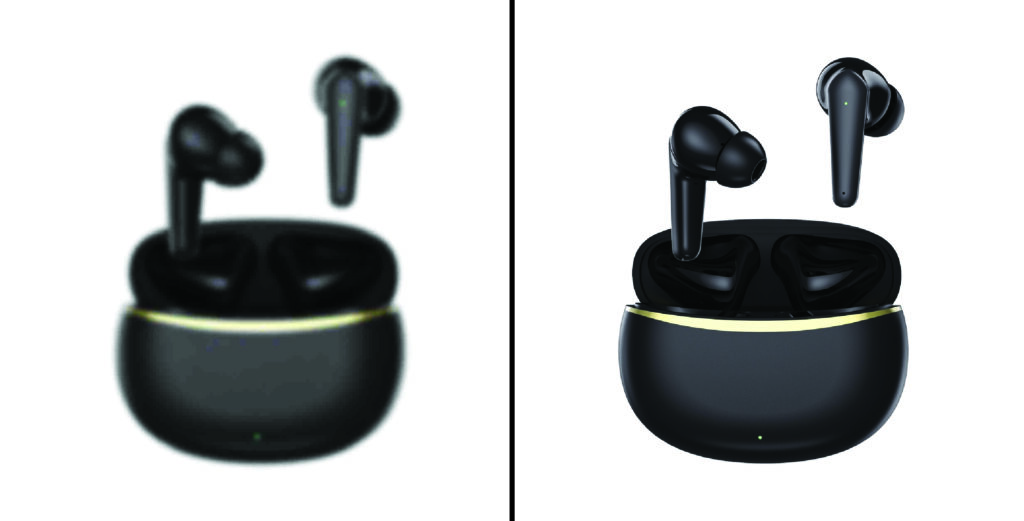
Image resolution significantly impacts customer experience.
Recommended specifications include:
Amazon enables zoom functionality only when images meet minimum resolution requirements.
Zoom allows customers to inspect details, improving confidence before purchase.
Amazon accepts several file formats, including:
JPEG remains the preferred option due to excellent quality and smaller file size.
Amazon recommends descriptive filenames.
Instead of:
IMG001.jpg
Use:
wireless-bluetooth-headphones-black.jpg
Although filenames have limited SEO impact inside Amazon, organized naming improves workflow and asset management.
Besides the main image, Amazon allows multiple supporting images.
These images help customers understand:
Successful listings usually include six to nine high-quality images.
Lifestyle photography demonstrates products in real-world situations.
Examples include:
Lifestyle images help customers imagine owning the product.
This emotional connection often improves conversion rates.
Infographics explain important product features visually.
Examples include:
Unlike the main image, secondary images may include text and graphics.
Well-designed infographics reduce customer confusion and answer common questions.
Macro photography highlights craftsmanship and premium quality.
Examples include:
Detailed images reduce uncertainty and improve purchase confidence.
Many returns occur because customers misunderstand product size.
Dimension graphics should clearly display:
Accurate size visuals set proper expectations.
Customers appreciate seeing exactly what they will receive.
Packaging images can include:
These images reduce confusion and customer complaints.
Fashion products require additional images.
Recommended angles include:
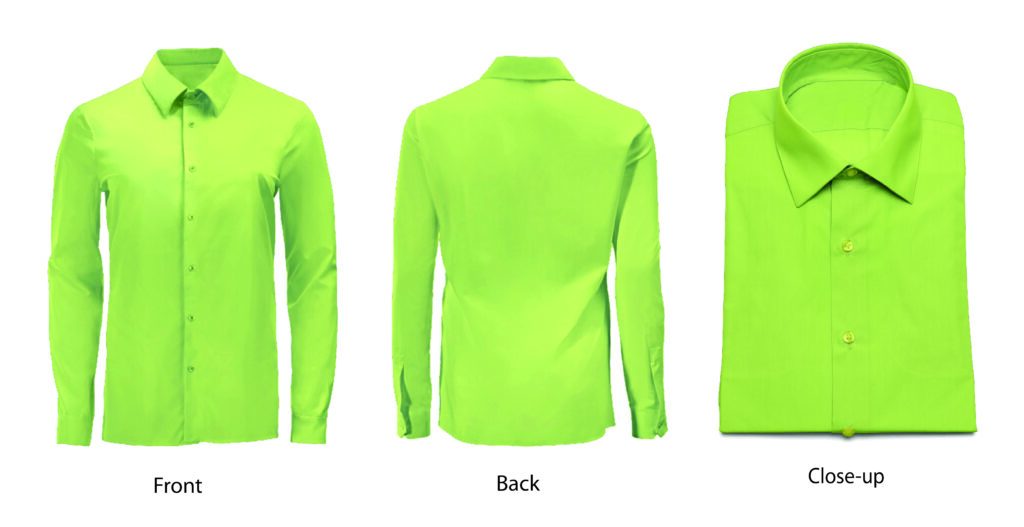
Consistent lighting and color accuracy are especially important for apparel.
Jewelry photography should emphasize:
Professional retouching removes dust, scratches, and reflections while preserving authenticity.
Electronic products benefit from images showing:
Accurate color correction prevents misleading customers.
Customers expect products to match listing photos.
Incorrect color editing leads to:
Professional color correction ensures accurate representation across different devices.
Although Amazon requires white backgrounds for primary images, background removal must be done carefully.
Professional clipping paths create:
Poor background removal leaves visible artifacts that appear unprofessional.
Natural shadows can improve realism.
Acceptable shadow styles include:
Avoid dramatic artificial shadows that distract from the product.
Professional retouching improves product presentation while maintaining authenticity.
Common retouching services include:
Avoid excessive editing that changes the actual appearance of the product.
More than half of Amazon shoppers browse using mobile devices.
Mobile-friendly product images should:
Simple, uncluttered compositions perform best.
Many sellers unknowingly violate Amazon image policies.
Common mistakes include:
Avoiding these issues improves listing approval rates.

A professional editing workflow typically includes:
Capture RAW photographs.
Perform color correction.
Adjust white balance.
Remove dust and imperfections.
Create clipping paths.
Replace background with pure white.
Optimize brightness and contrast.
Resize according to Amazon standards.
Export high-quality JPEG files.
Review images before uploading.
This workflow produces consistent, marketplace-ready images.
Managing hundreds or thousands of product images internally can become expensive and time-consuming.
Professional image editing companies provide:
This allows sellers to focus on inventory, marketing, and customer service.
Photographers can add value by delivering Amazon-ready images instead of raw photographs.
Offering services such as:
creates additional revenue opportunities and improves client satisfaction.
Marketing agencies handling multiple Amazon brands benefit from standardized editing workflows.
Professional editing partners help agencies:
Reliable outsourcing becomes especially valuable during seasonal sales events.
At Clipping Images, we specialize in delivering marketplace-ready product photography editing for Amazon sellers, photographers, brands, and creative agencies worldwide.
Our services include:
Every image is manually edited by experienced professionals to ensure precision, consistency, and compliance with Amazon’s image standards.
Following Amazon’s product image requirements is about far more than avoiding listing rejection—it is about creating a shopping experience that builds confidence and drives sales. Clear, professionally edited images help customers understand exactly what they are buying, making them more likely to click, purchase, and leave positive reviews.
By using high-resolution photography, accurate color correction, clean white backgrounds, detailed secondary images, and thoughtful composition, sellers can improve visibility and conversion rates in an increasingly competitive marketplace. Whether you manage a single product or an extensive catalog, investing in high-quality image editing is one of the most effective ways to strengthen your Amazon presence.
If you’re looking for reliable, professional editing services,
Clipping Images is ready to help you create Amazon-compliant product images that stand out, convert more shoppers into buyers, and support the long-term growth of your e-commerce business.