September 29, 2026
Photoshop has transformed the way photographers, designers, marketers, and creative professionals enhance digital images. A well-chosen filter can completely change the mood of a photograph, improve its visual appeal, and help create a distinctive artistic style. Whether you are working on portraits, landscapes, product photography, wedding images, social media content, or creative compositions, Photoshop filters can save time while giving your photos a professional finish.
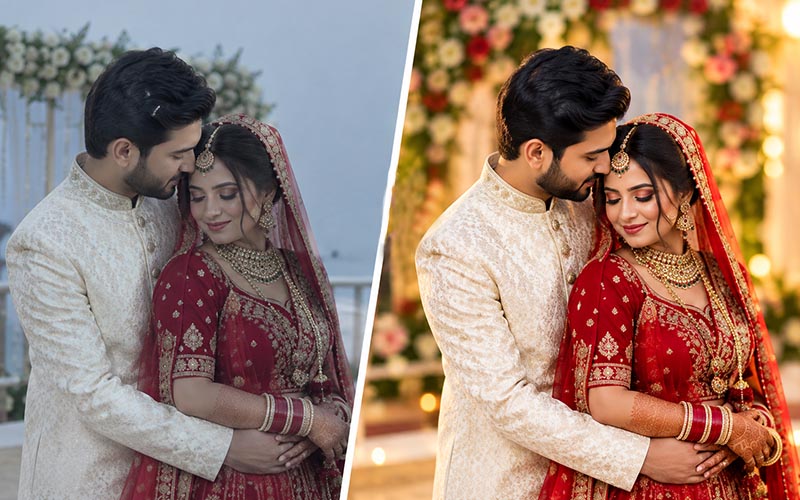
Instead of manually adjusting dozens of settings for every image, photographers can use carefully designed filter collections to achieve specific visual effects. From cinematic color grading to vintage film looks, black-and-white effects, dreamy portraits, and dramatic landscapes, there are countless ways to transform an ordinary photograph into a stunning image.
In this article, we will explore 10 creative Photoshop filters collections that can help you enhance your photography and develop a unique editing style. We will also explain how filters work, how to choose the right collection, and how to use them without making your photographs look overly processed.
What Are Photoshop Filters?
Photoshop filters are digital effects and editing tools that modify the appearance of an image. They can change colors, textures, sharpness, lighting, contrast, and other visual characteristics.
Some filters are designed for technical corrections, while others are created specifically for artistic effects.
For example, a photographer may use a filter to:
The right filter can dramatically improve an image, but filters should be used carefully. Applying an effect at 100% intensity may sometimes make a photograph look unnatural. Adjusting opacity, blending modes, and individual settings can help create a more professional result.
There are several reasons photographers and designers use Photoshop filter collections.
1. Save Editing Time
Professional photo editing can be time-consuming. A single image may require adjustments to exposure, contrast, color, saturation, highlights, shadows, and other elements.
A well-designed filter can provide a strong starting point with just a few clicks.
This is particularly useful when processing large collections of photographs.
2. Create Consistent Results
Photographers often need multiple images to have a similar visual appearance.
For example, a wedding photographer may want an entire gallery to have warm, romantic colors. A filter collection can help establish a consistent visual direction across hundreds of images.
3. Develop a Signature Style
A recognizable editing style can help photographers and creative professionals build their brands.
A photographer might prefer:
Filters can provide a foundation for developing such styles.
4. Experiment With Creativity
Filters make it easy to experiment with different artistic directions.
You can take the same photograph and create several versions using different filter styles. This makes filters useful for photographers who want to explore new creative possibilities.
10 Creative Photoshop Filter Collections
Now let’s explore ten filter categories that can help you create stunning and visually engaging photographs.
1. Vintage Film Photoshop Filters
Vintage film effects remain popular because they give digital photographs an authentic analog appearance.
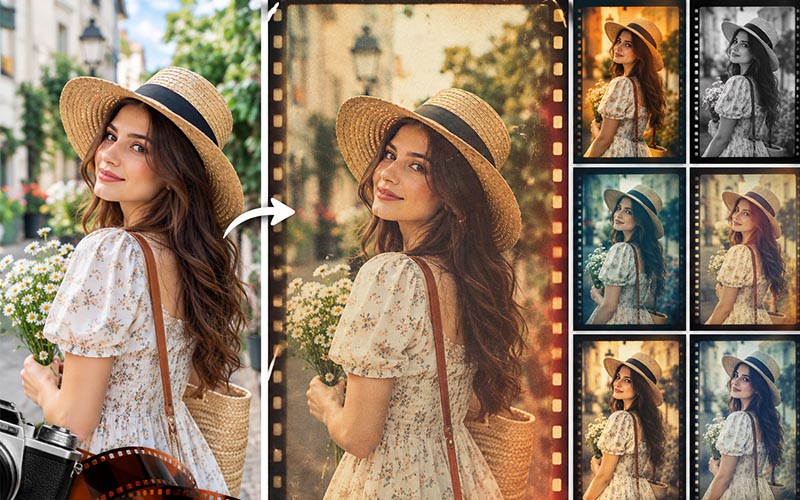
A good vintage filter collection can recreate characteristics associated with traditional film photography, including muted colors, subtle grain, faded blacks, warm highlights, and soft contrast.
Vintage filters work particularly well for:
A vintage filter can make a modern digital photograph feel nostalgic and timeless.
How to Use Vintage Filters
Start by applying the filter at a relatively low intensity. Then adjust contrast and saturation according to the original photograph.
Adding subtle film grain can make the effect more convincing. However, too much grain may reduce image clarity.
For portraits, pay particular attention to skin tones. A vintage effect should enhance the mood without making skin appear unnaturally orange, yellow, or gray.
Best Creative Approach
Vintage filters are most effective when used subtly. The goal is often to make viewers feel that the photograph was captured on film rather than obviously showing that a filter was applied.
Cinematic filters are ideal for photographers and designers who want photographs to resemble movie stills.
These filters often use controlled contrast, dramatic shadows, rich colors, and carefully balanced highlights.
Cinematic styles can work beautifully with:
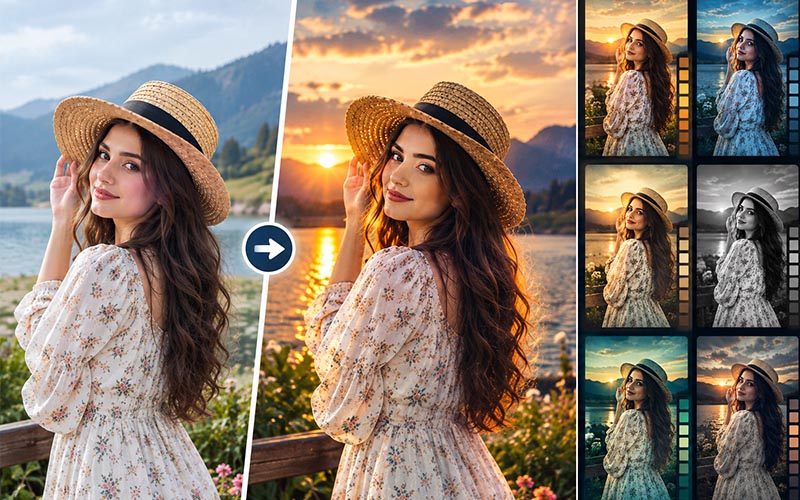
A cinematic filter can create a strong emotional atmosphere.
Creating a Cinematic Look
Many cinematic styles involve darker shadows and carefully controlled highlights. Color contrast can also play an important role.
For example, warm highlights combined with cooler shadows can create a dramatic color relationship.
However, the exact treatment should depend on the photograph. A bright outdoor portrait may require a lighter cinematic treatment, while a nighttime city image can support deeper shadows and stronger contrast.
Avoid Overprocessing
One common mistake is making cinematic photographs excessively dark.
A cinematic photograph can have dramatic contrast while still maintaining important details in the shadows.
3. Black-and-White Photoshop Filters
Black-and-white photography is one of the most timeless photographic styles.
Removing color shifts attention toward composition, texture, lighting, facial expressions, and emotion.
A Photoshop filter collection focused on black-and-white photography may include different contrast levels and tonal treatments.
Some effects can create:
Where Black and White Works Best
Black-and-white filters are particularly effective for:
When color is removed, lighting becomes especially important. Strong directional lighting can create dramatic results, while soft lighting can produce a gentle and elegant appearance.
Tip for Better Results
Do not simply remove saturation and stop there.
Adjusting individual tonal ranges can produce much more interesting black-and-white photographs. Pay attention to highlights, midtones, and shadows to create depth.
4. Moody Photoshop Filters
Moody photography has become increasingly popular among portrait, wedding, fashion, and lifestyle photographers.
Moody filters generally emphasize deeper shadows, subdued colors, rich tones, and atmospheric lighting.
This style can make photographs feel:
Moody filters work particularly well when the original photograph already has interesting lighting.
Using Moody Effects
Start with a photograph that has strong composition and directional light.
Reduce excessive saturation and carefully deepen shadows. Avoid crushing the blacks so much that important details disappear.
Moody editing should create atmosphere without destroying the photograph’s natural depth.
Best Subjects
Moody filters are especially useful for:
5. Pastel Photoshop Filters
Pastel effects create soft, bright, and gentle color palettes.
They are especially popular for lifestyle photography, fashion, portraits, social media images, and wedding photography.
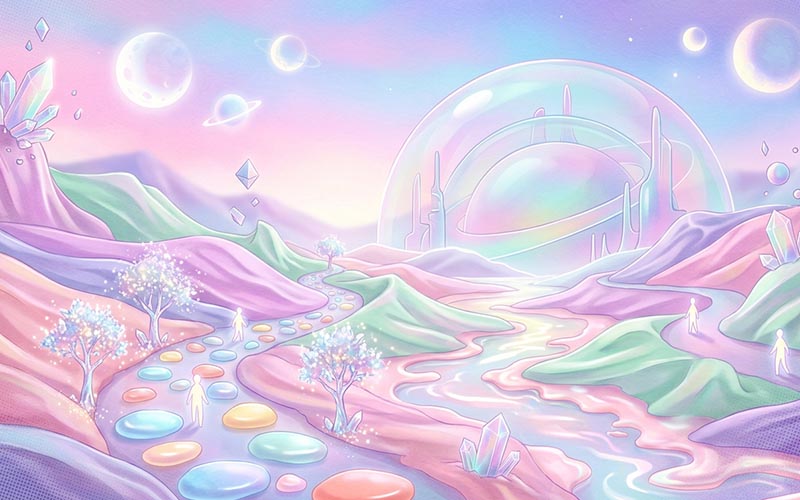
Pastel filter collections may include:
These filters can give photographs a clean and modern appearance.
Why Pastel Filters Are Popular
Pastel colors can create a cheerful and elegant atmosphere without appearing overly saturated.
They work particularly well with photographs that already have bright natural lighting.
Tips for Pastel Editing
Avoid increasing brightness too much.
Instead, focus on reducing harsh contrast and controlling saturation. Slightly lifting the shadows can also create a soft appearance.
Pastel filters are particularly effective for spring and summer photography.
Matte effects give photographs a soft, sophisticated appearance by reducing strong contrast and creating softer black levels.
A matte filter can make digital photographs look more polished and editorial.

Matte styles are frequently used in:
How Matte Filters Work
Traditional photographs often contain deep blacks and bright highlights.
A matte effect typically reduces the intensity of pure blacks, producing a softer tonal range.
The result can feel subtle and sophisticated.
When to Use Matte Effects
Matte filters work especially well when the photograph already has balanced lighting.
They may be less effective on images that are severely underexposed or overexposed because reducing contrast further can make the image appear flat.
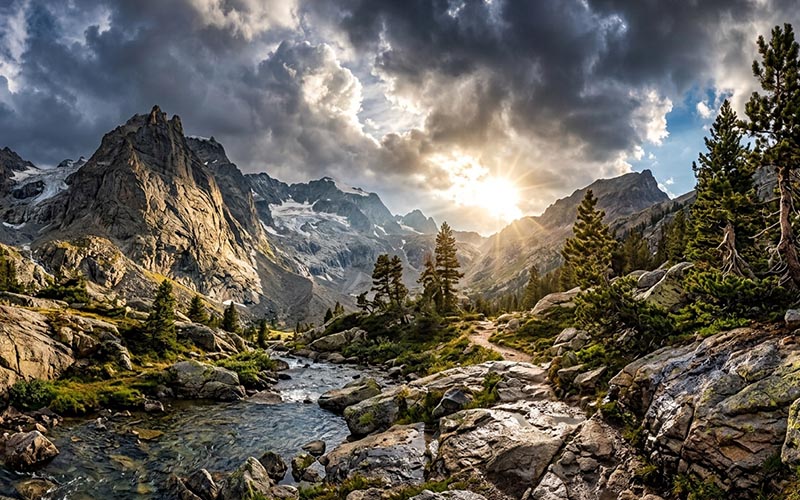
HDR-inspired filters can emphasize details, textures, and tonal differences.
They can be useful for:
A carefully applied HDR-style effect can make clouds, buildings, mountains, and textures appear more dramatic.
Avoid Excessive HDR
One of the biggest mistakes in HDR editing is excessive processing.
Overdone HDR can produce:
Professional editing generally requires restraint.
Apply the effect at a lower intensity and adjust it according to the subject.
For portraits, strong HDR effects should generally be used cautiously because excessive texture enhancement can emphasize skin imperfections.
Dreamy filters create soft highlights, gentle contrast, and glowing light.
They are excellent for romantic and artistic photography.
Dreamy effects can work beautifully with:
A soft glow can create a magical atmosphere, especially when the original photograph contains backlighting or natural sunlight.
Creating a Dreamy Effect
The effect should generally be subtle.
Bright areas can be softened while preserving important details in the subject.
You can also combine a soft glow with warm tones to create a romantic appearance.
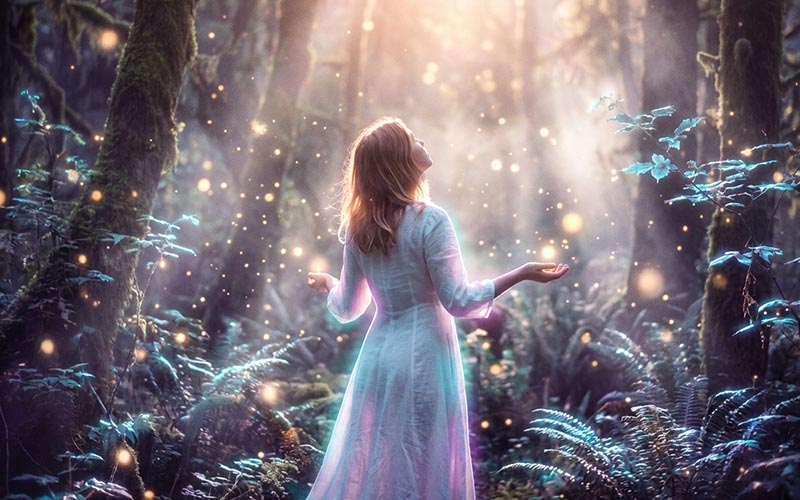
Best Photography Conditions
Dreamy filters work particularly well when photographs are captured during:
The original lighting plays an important role in determining how successful the effect will be.
Retro editing can recreate the distinctive visual characteristics of older photography and popular culture.
Depending on the collection, retro filters may include:
Retro filters can be excellent for creative projects, fashion photography, music-related content, posters, and social media campaigns.
Creating an Authentic Retro Appearance
Combining several subtle characteristics usually works better than applying one extreme effect.
For example, you could combine:
The result can feel more authentic than a heavily stylized effect.
Portrait-focused filter collections are designed to improve the appearance of people while maintaining natural skin texture.
These filters may help with:
Professional portrait filters are particularly useful for photographers who regularly work with:
Natural Retouching Matters
Portrait editing should enhance rather than completely change the subject.
Over-smoothing skin can remove natural texture and make the face look artificial.
A professional result usually requires a combination of automated effects and manual adjustments.
How to Choose the Right Photoshop Filter Collection
With so many options available, selecting the right collection can be difficult.
Consider these factors before choosing a filter.
Consider Your Photography Style
Choose filters that complement the type of photography you create.
For example, wedding photographers may prefer warm, romantic, pastel, or film-inspired effects.
Landscape photographers may prefer cinematic, HDR, or dramatic filters.
Portrait photographers may benefit from natural skin and color-enhancement collections.
Check Compatibility
Before purchasing or downloading a filter collection, check whether it is compatible with your version of Photoshop.
Some effects may be designed as:
Make sure you understand the format before using it.
Look for Adjustable Effects
The best collections usually allow you to modify the intensity of the effect.
An effect that can be adjusted gives you greater creative control.
Check Before-and-After Examples
Before using a collection, examine examples created with the filters.
Look closely at:
A good filter should enhance the photograph rather than hide its original qualities.
How to Use Photoshop Filters Professionally
Using filters effectively requires more than simply clicking an effect.
Start With a High-Quality Image
Filters cannot fix every technical problem.
Start with a photograph that has:
A high-quality source image will generally produce better results.
Correct the Image First
Before applying creative filters, fix technical problems.
Adjust:
Then apply the creative effect.
Reduce Filter Intensity
Do not automatically use the filter at maximum strength.
Reducing opacity can create a much more natural appearance.
Use Layer Masks
Layer masks allow you to apply a filter selectively.
For example, you might want a cinematic color effect across the background while keeping the subject’s skin tone natural.
A layer mask gives you precise control over where the effect appears.
Combine Multiple Adjustments Carefully
You can combine several Photoshop effects, but avoid adding too many.
A strong editing workflow often uses a few carefully controlled adjustments rather than dozens of effects.
Photoshop Filters vs Manual Editing
Filters can speed up the editing process, but they should not completely replace manual editing.
Filters
Advantages:
Limitations:
Manual Editing
Advantages:
Limitations:
The most effective approach is often to combine both methods.
Use a filter as a starting point, then manually refine the photograph.
Tips for Creating Stunning Photos With Photoshop Filters
Here are some practical tips for achieving better results.
1. Keep the Original Photograph
Always preserve the original image before applying significant edits.
2. Work Non-Destructively
Use adjustment layers and smart objects whenever possible.
This allows you to modify your edits later.
3. Don’t Overuse Saturation
Excessive saturation can make photographs look unnatural.
4. Protect Skin Tones
When editing portraits, always check the skin carefully.
5. Maintain Detail
Avoid crushing shadows or blowing out highlights.
6. Compare Before and After
Regularly toggle the effect on and off.
Ask whether the filter actually improves the photograph.
7. Match the Filter to the Lighting
A filter designed for bright outdoor photography may not work well on a dark indoor photograph.
8. Create Your Own Presets
Once you develop a style you like, save your settings for future projects.
This can significantly speed up your workflow.
Benefits of Using Filter Collections for Professional Photographers
Professional photographers often need to process large numbers of images quickly.
Filter collections can help streamline this process.
For example, a wedding photographer may have hundreds of photographs from one event. Instead of manually creating a color treatment for every photograph, the photographer can apply a consistent starting effect and then make individual adjustments.
Similarly, a portrait photographer can use a consistent color treatment across an entire client session.
This improves workflow efficiency while helping maintain a recognizable style.
Common Mistakes When Using Photoshop Filters
Even a high-quality filter can produce poor results if used incorrectly.
Using Every Filter at Full Strength
Maximum intensity is rarely appropriate for every photograph.
Ignoring Original Lighting
Filters cannot be applied identically to photographs captured under completely different lighting conditions.
Over-Smoothing Skin
Natural texture is an important part of realistic portrait photography.
Applying Too Many Effects
Combining multiple strong effects can make the image visually confusing.
Forgetting Color Accuracy
Creative editing should not destroy important colors, particularly in product, fashion, and wedding photography.
Creative Photoshop filters provide photographers and designers with an efficient way to transform ordinary photographs into visually compelling images. From vintage film and cinematic styles to dreamy glow, matte effects, pastel colors, moody tones, and professional portrait treatments, different filter collections can serve different creative purposes.
The key to successful editing is not simply finding the most dramatic effect. Instead, the goal is to select a style that complements the subject, lighting, composition, and intended mood of the photograph.
Filters are most effective when they are treated as creative tools rather than one-click solutions. Start with a high-quality image, correct technical problems first, apply the filter at an appropriate intensity, and make manual adjustments where necessary.
Whether you are a professional photographer, graphic designer, digital artist, or content creator, building a collection of useful Photoshop filters can make your workflow faster and more creative.
With the right techniques, filters can help you develop a consistent visual identity, experiment with new styles, and create stunning photographs that capture attention.