October 18, 2026
Background removal is a common step in preparing images for online stores, catalogs, advertisements, and product listings. Automated tools can process many straightforward images quickly, while manual editing offers greater control over difficult edges and fine details. The right choice depends on the type of product, the intended output, the volume of images, and how much quality control is required. Rather than assuming one method is always better, businesses can compare the strengths and limits of each and build a workflow around the images they actually produce.

Automated tools use image analysis and machine-learning techniques to identify a subject and separate it from its background. They can be convenient for products with clear outlines, strong contrast, and uncomplicated backgrounds. For large batches, automation can reduce the time needed for an initial cutout and help teams process routine images at scale.
Results vary with image quality and subject complexity. Fine chains, transparent glass, reflective objects, hair, fur, and objects with low contrast against the background can be difficult. Automated output should be reviewed rather than assumed correct, especially when images represent products customers will purchase.
Manual techniques such as clipping paths and detailed masking let an editor control the boundary more precisely. This is useful for defined product edges, complex silhouettes, small openings, and images where a visible halo or missing detail would be unacceptable. Skilled editors can also make decisions based on the intended background and the material being represented.
Manual editing takes time and may cost more for large quantities of simple images. It also depends on the editor’s skill and the clarity of the instructions. A manual workflow still needs standards and quality control; human involvement alone does not guarantee a perfect result.

Simple items with clean edges may be suitable for automated removal, particularly when the image will be displayed small. Products with intricate shapes, thin straps, reflective surfaces, transparent materials, or important edge details may require manual refinement. Apparel, jewelry, glassware, and complex accessories often deserve extra review.
The background itself also matters. A product photographed against a contrasting, evenly lit backdrop may be easier to isolate than one with shadows or colors that blend into the object. Test a representative selection from each product category before choosing a standard process.
Automation may lower the initial cost per image, but correction time should be included. If staff must repair many cutouts, rename files, and check every result, the savings may be smaller than expected. Manual editing may cost more per image but reduce internal rework for difficult products.
Compare the complete workflow: upload, processing, review, correction, export, and organization. Use a small test to estimate the real error rate and the time required to make each image usable. Different product categories may justify different methods rather than a single solution for the whole catalog.
A hybrid workflow uses automation for suitable images and manual editing for images that need greater precision. Automated output can be used as a first pass, then flagged images can be routed for manual cleanup. The rules should be simple enough for the team to apply consistently.
Define escalation criteria such as visible halos, missing details, complex transparency, uneven edges, or high commercial importance. Keep a record of the categories that repeatedly need manual work. Over time, the data can help you refine the workflow and avoid spending specialist time on images that do not need it.
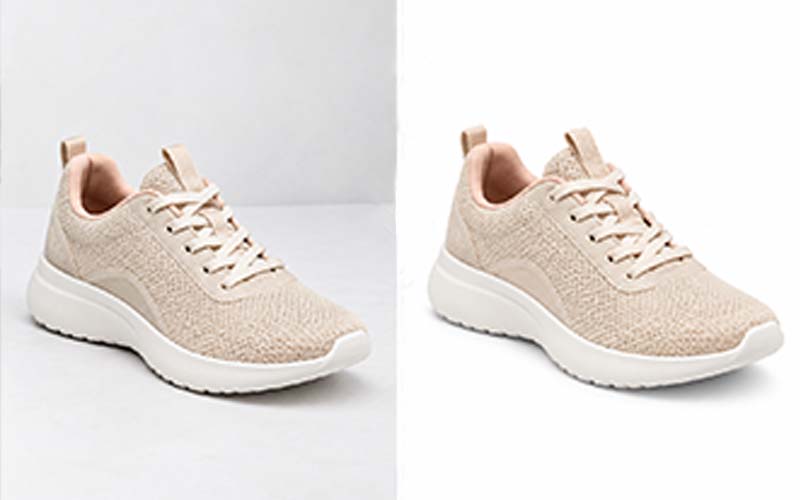
Review the final image against the intended background. Inspect fine edges, holes, straps, transparent areas, and shadows. Look for leftover background pixels, unnatural outlines, clipped product details, or a cutout that appears to float. A result that looks acceptable on a white preview may reveal defects on a colored background.
Also verify the output dimensions, format, crop, and filenames. Use a consistent quality checklist for both automated and manual work. The purpose is to deliver accurate, useful images—not to favor a method for its own sake.

The destination for an image can influence how much precision is needed. A small thumbnail may not reveal a minor edge defect, while a large product detail page or campaign image can make that defect obvious. Images placed on colored backgrounds may expose halos that are difficult to see on white. Decide where the image will appear before setting the acceptable quality level.
Also consider whether the background is meant to be transparent or a specific solid color. A transparent file can be reused in several layouts, but its edges need to remain clean against different backgrounds. A white-background image may require consistent white values and a natural shadow. Include these details in the brief so the chosen method is judged against the real use case.
A tool may perform well on a simple bottle or box but struggle with a clear glass, fine chain, furry product, or object whose edges blend into the background. Build a small test set that represents the range of products in your catalog. Keep examples of both successful and unsuccessful results so the team can make consistent decisions about when manual review is required.
Record the types of errors that occur most often. If one product category repeatedly needs edge correction, route that category to a different workflow instead of repeatedly repairing the same problem after processing. A targeted process is usually more efficient than treating every image as identical.
Create simple criteria for deciding whether an image can pass automatically or needs a closer look. Examples include visible halos, missing product parts, rough edges, transparent areas that look opaque, and shadows that no longer match the product. Reviewers should know what to flag and where to record the issue.
Keep the rules practical. If staff need to study a long technical document before judging an image, they may apply the process inconsistently. Use a short checklist supported by clear example images. Update it when new product types or recurring defects appear, and check that the workflow still produces the expected result after software or process changes.
Before the work begins, translate your expectations into instructions that can be followed consistently. State the objective, required output, technical specifications, and any details that must remain unchanged. Include representative examples and identify unusual images that may need special handling. A concise brief is more useful than a long request that leaves important decisions open to interpretation.
Ask the person completing the work to raise questions before processing a full batch. Confirm assumptions about edge treatment, color, crop, naming, file format, and revision rules. This small alignment step can prevent large amounts of rework and creates a reference that can be reused for future projects.
A frequent mistake is to focus on the finished image while overlooking the process that produces it. Unclear filenames, inconsistent source files, missing references, and late changes to the brief can cause errors even when the editing itself is strong. Establish a predictable way to submit files, communicate changes, approve samples, and receive final outputs.
Another mistake is to judge a provider or method using only one easy image. Include representative examples and assess the output as a group. Check both visual quality and delivery accuracy, and record issues in a way that makes them easy to correct. A consistent workflow makes problems easier to identify before they spread across an entire project.
Before approving delivery, check the image against the original brief. Confirm that the subject is intact, important details remain visible, the color and crop are appropriate, and there are no distracting edges or artifacts. Verify file dimensions, formats, naming, and the number of files received. A visual review and a technical file check catch different types of errors, so both should be part of the process.
Use the checklist proportionately. High-value, complex, or campaign-critical images may need a full review, while routine items can be reviewed through a consistent sampling process once the workflow is proven. If an error appears repeatedly, increase inspection and update the instructions until the issue is resolved.
Do not treat the first delivery as the only measure of success. Over several projects, track recurring corrections, turnaround reliability, communication quality, and the amount of internal time required to prepare or fix files. These observations provide a more realistic view of the process than a single successful example.
Use the results to make targeted improvements. If errors cluster around one image type, provide better reference material or adjust the technique. If files are frequently misplaced, revise the naming process. Regular, practical reviews help keep the workflow aligned with changing products, catalog size, and business priorities.
It can be suitable for straightforward images, but difficult edges and high-value product images should be reviewed carefully.
Manual editing offers control, but results still depend on skill, instructions, and quality checks.
A hybrid workflow often works well: automate simple images and manually review complex or high-priority items.
Look for halos, jagged edges, missing details, leftover background pixels, and unnatural shadows.
Choosing the right approach to background removal starts with a clear understanding of your images, quality expectations, deadlines, and workflow. Define the result you need, use representative examples, and review the output against consistent standards. A practical process helps your team avoid preventable revisions and make better decisions as image volume grows. Revisit your workflow periodically so it continues to fit your products, customers, and business goals.
If your catalog includes images that need precise clipping paths or manual background cleanup, review the relevant ClippingImages.com services and test the workflow on representative products.
Suggested filename: manual-vs-automated-background-removal-clippingimages.jpg
Suggested alt text: Professional guidance about background removal for e-commerce and photography businesses.