June 25, 2026
In today’s competitive online marketplace, high-quality product photography is one of the most powerful tools for increasing sales and building customer trust. Whether you’re an e-commerce seller, a professional photographer, or a creative agency managing product catalogs, understanding the fundamentals of product photography can significantly improve your results.
Online shoppers cannot physically touch, feel, or test products before purchasing. As a result, product images become the primary factor influencing buying decisions. Studies consistently show that customers are more likely to purchase products with clear, professional, and detailed images.
This comprehensive guide covers essential product photography tips for e-commerce beginners, helping you create attractive product images that drive conversions and strengthen your brand presence.
Before diving into techniques, it’s important to understand why product photography is crucial.
Professional product photos:

Poor-quality photos can make even excellent products appear unprofessional. On the other hand, well-executed product photography helps products stand out in crowded marketplaces like Amazon, Shopify, Etsy, Walmart, and eBay.
One of the biggest misconceptions among beginners is that expensive equipment is required to produce professional product images.
While high-end gear can help, beginners can achieve impressive results using:

Many successful e-commerce sellers start with smartphones because today’s devices offer excellent image quality and powerful editing capabilities.
For consistent product photography, consider investing in:
A stable setup helps maintain image consistency across an entire product catalog.
Lighting is arguably the most important aspect of product photography.
Even the most expensive camera cannot compensate for poor lighting conditions.

Soft lighting reduces harsh shadows and highlights product details more effectively.
Popular lighting options include:
Direct flash often creates:
Instead, use diffused light sources that evenly illuminate the product.
When photographing multiple products, consistent lighting ensures a professional and cohesive catalog appearance.
This consistency is particularly important for fashion brands, electronics stores, and large e-commerce inventories.
Background selection plays a major role in product presentation.
A white background remains the industry standard because it:
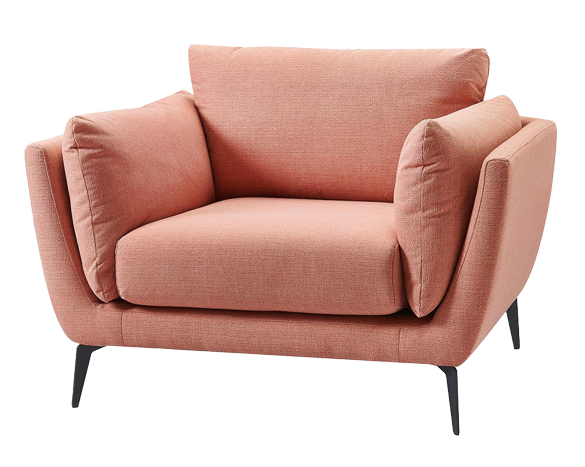
Major platforms like Amazon often require pure white backgrounds for main product images.
Lifestyle images help customers visualize products in real-world situations.
Examples include:
Combining white-background images with lifestyle photography creates a stronger product listing.
Composition determines how effectively your product captures attention.

For marketplace listings, center positioning provides a clean and professional appearance.
For marketing images and social media content, the rule of thirds creates visually appealing compositions.
This technique places key product elements along imaginary grid lines to create balance and interest.
Different platforms require different image dimensions.
Leaving sufficient space around the product allows flexibility during post-processing and publishing.
Customers want to see products from every possible perspective.
Providing multiple angles helps answer buyer questions before they arise.
Essential angles include:
For fashion and accessories, additional lifestyle shots can further improve customer confidence.
One of the most effective product photography tips for e-commerce beginners is to emphasize product details.
Customers often zoom into images before purchasing.
Photograph:

Detailed shots demonstrate quality and reduce uncertainty during the buying process.
Blurry images immediately reduce professionalism and trust.
A tripod eliminates camera shake and ensures sharp results.
Focus directly on the most important product features.
For example:
Keeping ISO low minimizes image noise and preserves fine details.
This results in cleaner, more professional product photographs.
Understanding basic camera settings can dramatically improve image quality.
A higher f-stop, such as f/8 to f/16, keeps more of the product in focus.
This is ideal for e-commerce photography where customers need to see the entire item clearly.
When using a tripod, slower shutter speeds are acceptable because the camera remains stable.
Correct white balance ensures accurate product colors.
Accurate color representation reduces customer dissatisfaction and product returns.
Online buyers often struggle to understand product size.
Help them visualize dimensions by:
This technique is especially useful for home decor, accessories, electronics, and handmade products.

Lifestyle photography goes beyond simple product documentation.
It tells a story.
Customers connect emotionally with products when they see them being used in realistic situations.
Examples include:
Lifestyle photography can significantly increase engagement and conversion rates.
Consistency is a key element of successful e-commerce photography.
Develop a visual style that reflects your brand identity.
Maintain consistency in:
Consistent imagery strengthens brand recognition and creates a more professional storefront.
Photography does not end after the shoot.
Professional editing transforms good photos into exceptional product images.

Common adjustments include:
Clean backgrounds help products stand out.
Professional background removal is one of the most widely used editing services in e-commerce photography.
Remove:
Retouching should improve image quality without misleading customers.
As product catalogs grow, manual editing becomes time-consuming.
Professional clipping path services can help by providing:
Businesses that require consistent, high-volume image editing often partner with specialized providers such as Clipping Images to streamline production workflows.
Product photography can also improve search engine visibility.
Instead of:
IMG001.jpg
Use:
black-leather-office-chair.jpg
Search engines cannot fully understand images without descriptive text.
Good alt text improves:
Example:
“Black ergonomic office chair with adjustable armrests.”
Large image files slow website performance.
Use image optimization tools to:
Fast-loading pages contribute to better rankings and higher conversion rates.
Different marketplaces have specific image guidelines.
Always review platform requirements before uploading.
Common requirements include:
Compliance helps avoid listing issues and improves visibility.
Product photography is not one-size-fits-all.
Experiment with:
Monitor customer engagement and conversion performance to determine what works best for your audience.
Many beginners make avoidable mistakes.
Watch out for:
Insufficient lighting creates dark and unprofessional images.
Distracting backgrounds shift attention away from the product.
Different editing styles across product listings weaken brand identity.
Low-quality images reduce trust and limit zoom functionality.
Misleading colors increase customer dissatisfaction and return rates.
Customers expect multiple views before making purchasing decisions.
As your business grows, efficiency becomes increasingly important.
Create a repeatable workflow:
A structured process improves consistency while reducing production time.
Learning product photography does not require years of experience or expensive equipment. By mastering lighting, composition, backgrounds, camera settings, and professional editing techniques, beginners can create high-quality images that compete with established brands.
Strong product photography directly impacts customer trust, engagement, and sales performance. Whether you’re an e-commerce seller launching your first store, a photographer expanding your service offerings, or an agency managing client catalogs, investing in professional product imagery is one of the smartest decisions you can make.
Combine excellent photography with expert post-production services such as clipping path, background removal, color correction, and retouching to achieve truly professional results. With consistency, practice, and attention to detail, your product images can become a powerful sales tool that helps your business stand out in today’s highly competitive e-commerce landscape.