August 20, 2026
Skin retouching in Photoshop is one of the most important skills in professional photo editing. Whether you are a portrait photographer, e-commerce seller, fashion brand, beauty business, or creative agency, high-quality skin retouching can make photographs look polished while preserving the subject’s natural appearance. The goal is not to make skin look artificial or completely flawless. Instead, professional retouching focuses on improving distracting imperfections, balancing skin tones, reducing temporary blemishes, and creating a clean, consistent image.
For businesses that depend on visual content, professionally retouched images can improve brand presentation and help customers develop confidence in products and services. From beauty product campaigns to fashion catalogs and professional portraits, Photoshop provides powerful tools for achieving controlled and realistic skin retouching.
Skin retouching in Photoshop is the process of enhancing the appearance of skin while maintaining realistic texture, detail, and natural characteristics. It can involve removing temporary blemishes, reducing uneven tones, correcting discoloration, softening harsh areas, and improving the overall appearance of a photograph.
Professional skin retouching is different from simply applying a blur filter. Excessive blur can remove pores and fine details, making skin appear plastic or unnatural. A better approach combines several Photoshop techniques, such as the Healing Brush, Spot Healing Brush, Clone Stamp, Curves, masks, frequency separation, and selective color adjustments.
The most effective retouching workflow depends on the image and its intended use. A high-end beauty campaign may require detailed skin work, while an e-commerce lifestyle photograph may only need subtle corrections.
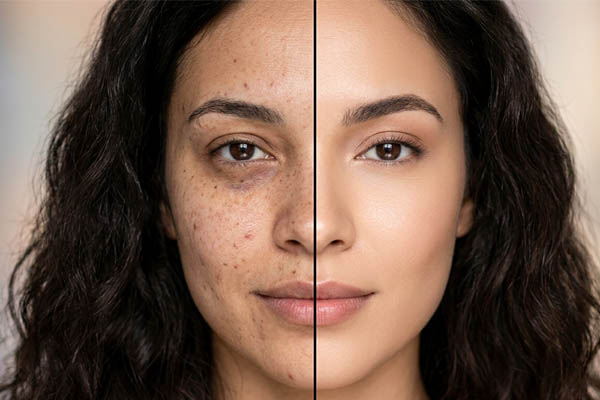
In commercial photography, small visual imperfections can become more noticeable when an image is displayed at a large size. Dust, temporary blemishes, uneven skin tones, and harsh lighting can distract viewers from the subject or product.
Professional skin retouching helps create a more polished visual presentation without destroying the natural character of the photograph. For e-commerce brands, consistent editing can also help maintain a unified appearance across product listings, social media campaigns, advertisements, and websites.
For photographers and agencies, professional retouching can save time during post-production and provide clients with images that meet commercial standards. Consistency is especially important when editing large batches of photographs.
Before beginning skin retouching in Photoshop, start with the highest-quality image available. A high-resolution RAW file gives you more information and flexibility than a heavily compressed JPEG.
Create a duplicate of the original layer so the editing process remains non-destructive. You can also organize the workflow using separate layers for cleanup, tone correction, color adjustment, and finishing.
Zooming in is useful for identifying small imperfections, but avoid working exclusively at extreme magnification. Skin may look different when viewed at 100%, 50%, or the final output size. Frequently zoom out to evaluate whether your adjustments look natural.
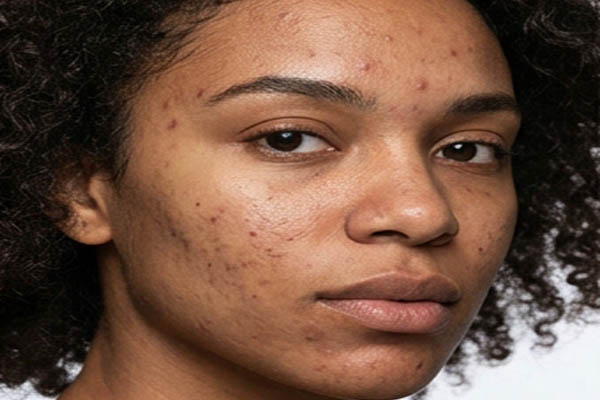
A useful principle is simple: retouch what distracts, not what makes the subject human.
The first stage of skin retouching usually involves cleaning up temporary imperfections. These may include acne, small spots, dust marks, stray hairs, or other distractions.
Photoshop’s Spot Healing Brush is useful for quick corrections. Select the tool, choose an appropriate brush size, and click or gently paint over the unwanted area. Photoshop automatically analyzes surrounding pixels and attempts to create a suitable replacement.
For more complex areas, the Healing Brush gives you greater control because you can select the source area manually. This is particularly helpful when the surrounding skin contains different textures or lighting.
The Clone Stamp tool can also be useful when precise texture replacement is required. Use it carefully, because excessive cloning can create repetitive patterns.
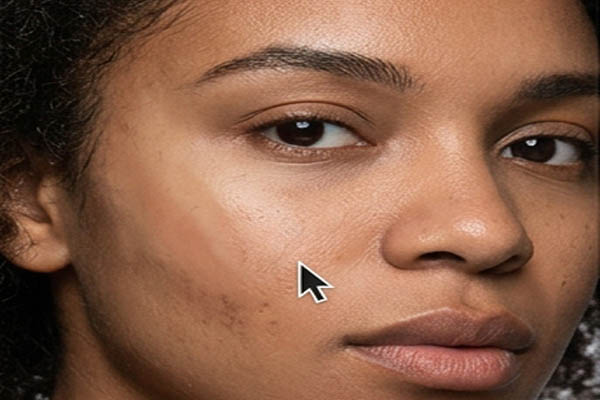
When removing blemishes, avoid deleting permanent characteristics such as freckles, scars, birthmarks, or other defining features unless the client specifically requests it.
Uneven skin tone can be caused by lighting, makeup, shadows, redness, or differences in natural pigmentation. Instead of blurring the entire face, professional retouchers often correct tonal variations selectively.
Photoshop adjustment layers make this process easier and more flexible. Curves can be used to modify brightness and contrast, while Hue/Saturation and Selective Color can help refine problematic color areas.
Layer masks are particularly useful because they allow adjustments to be applied only where needed. For example, if one cheek is slightly darker than the other, you can make a subtle tonal correction without affecting the entire image.
The key is moderation. Skin should have variation. Completely uniform color usually looks less realistic.
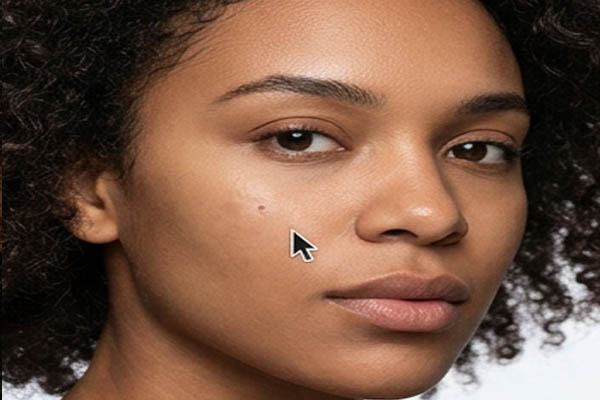
One of the biggest mistakes beginners make when learning skin retouching in Photoshop is removing too much texture. Real skin contains pores, fine lines, small variations, and natural detail. Removing these characteristics can make the subject look artificial.
Rather than smoothing everything, identify areas that genuinely need correction. Keep important texture around the eyes, lips, nose, forehead, and other areas where natural detail contributes to realism.
A good retouch should be difficult to notice. Viewers should focus on the person, clothing, product, or overall composition rather than thinking about the editing.
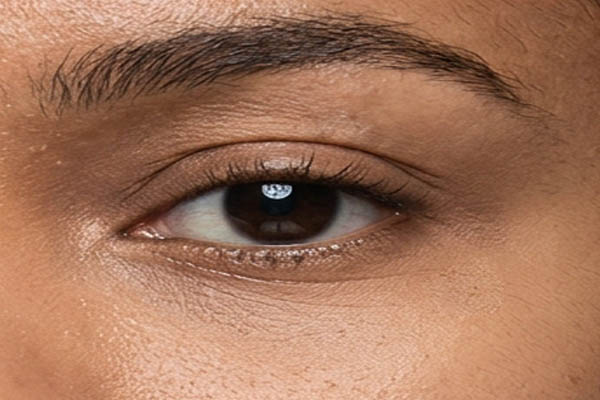
Frequency separation is a popular Photoshop technique for advanced skin retouching. It separates image information into different layers so that color and texture can be edited independently.
The lower-frequency layer generally contains broader color and tonal information, while the higher-frequency layer contains fine details and texture. This separation allows a retoucher to make controlled corrections without unnecessarily destroying skin texture.
Frequency separation can be powerful for professional beauty and fashion photography, but it should not be treated as a shortcut for every image. Poorly applied frequency separation can produce overly smooth skin, visible transitions, or unnatural patches.
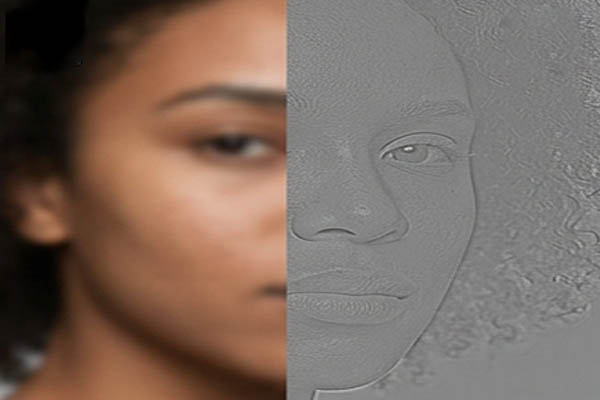
For commercial work, the technique is most effective when combined with careful observation and subtle adjustments.
Dodging and burning is another important technique in professional skin retouching. It involves selectively brightening and darkening areas to improve tonal balance and preserve facial dimension.
Instead of simply smoothing shadows, a retoucher can gently reduce distracting dark spots and balance uneven highlights. This can make the skin appear cleaner while retaining natural facial structure.
Dodge and burn is especially valuable in beauty photography because subtle tonal adjustments can enhance the appearance of skin without making it look blurred.
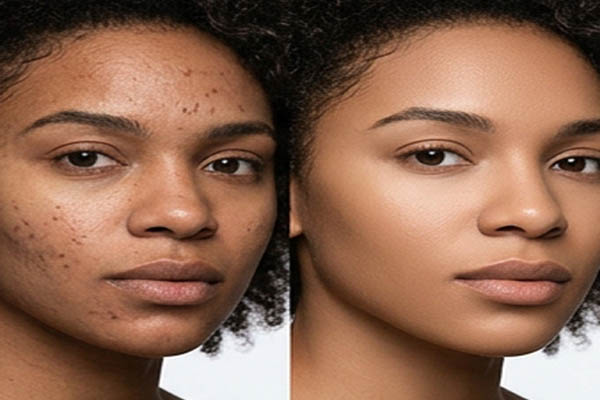
Always use a soft brush and low opacity or flow when working with these techniques. Multiple subtle strokes generally produce better results than one aggressive adjustment.
E-commerce businesses often need consistent images across large product catalogs. When models are included in product photography, skin retouching becomes an important part of maintaining professional presentation.
For fashion retailers, cosmetics companies, jewelry brands, and lifestyle stores, model photographs should look polished while remaining believable. Over-retouched skin can reduce customer trust because shoppers increasingly expect authentic product imagery.
E-commerce retouching should therefore focus on consistency, cleanliness, color accuracy, and brand presentation.
If the photograph features cosmetics or skincare products, preserving realistic skin texture can be particularly important. Customers may want to understand how a product appears on real skin, so excessive retouching can be counterproductive.
Portrait photographers typically have more creative freedom than e-commerce editors. Depending on the client’s preferences, a portrait may require subtle corrections or a more refined editorial treatment.
Professional portrait retouching can include blemish removal, skin tone correction, eye enhancement, hair cleanup, teeth whitening, and controlled facial contour adjustments.
However, communication with the client is important. Some clients prefer a natural look, while others may request a highly polished editorial appearance. Establishing expectations before editing helps prevent unnecessary revisions.
Beauty and fashion photography often requires detailed retouching because images may be used in advertisements, magazines, websites, social media, and promotional campaigns.
High-end beauty retouching may involve careful texture correction, color balancing, makeup refinement, stray hair removal, and detailed dodge and burn work.
The objective is not simply to make skin flawless. Instead, the image should communicate the intended brand identity while maintaining believable human detail.
For agencies managing large campaigns, creating consistent retouching standards can help ensure that images from different photographers or shooting sessions maintain a similar visual style.
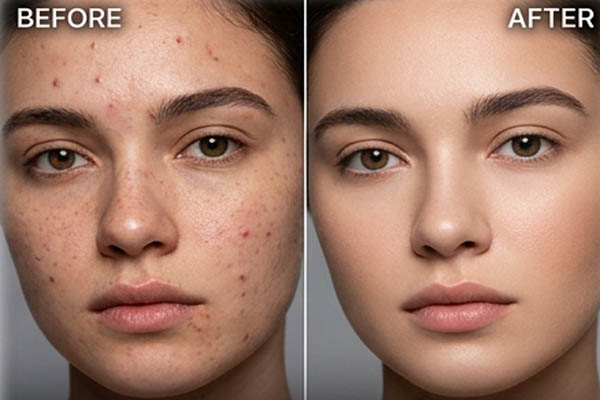
Several common mistakes can reduce the quality of Photoshop skin retouching.
Overusing blur: Blurring the entire face removes texture and produces a plastic appearance.
Removing every imperfection: Not every mark needs to disappear. Some characteristics are part of the subject’s identity.
Ignoring skin tone: Clean texture cannot compensate for inconsistent or unnatural color.
Over-sharpening: Excessive sharpening can make pores, wrinkles, and other details appear harsh.
Working destructively: Editing directly on the original layer makes it difficult to revise mistakes.
Ignoring the final output: An image intended for a website may require different treatment than a large advertising print.
Avoiding these mistakes is one of the fastest ways to improve your retouching skills.
A professional Photoshop workflow should make revisions easy. Use duplicate layers, adjustment layers, masks, and organized layer groups whenever possible.
A practical workflow may look like this:
This approach gives you more control and makes it easier to return to earlier stages if a client requests changes.
Natural skin retouching depends more on restraint than on the number of tools you use. Before making an adjustment, ask whether the issue is actually distracting.
Work gradually and frequently compare the edited image with the original. Temporarily reducing the opacity of your retouching group can help you determine whether the result has become too strong.
Another useful technique is to flip the image horizontally. This can make uneven edits easier to notice because your brain is less familiar with the reversed composition.
Always inspect the final image at the size at which customers or viewers will actually see it. A small imperfection that looks significant at 200% may be completely invisible in the final web image.
E-commerce sellers, photographers, and agencies often have large numbers of images to process. Retouching every photograph internally can consume valuable time, particularly when teams need to meet strict publishing schedules.
Outsourcing professional photo retouching can provide access to experienced editors while allowing photographers and businesses to focus on photography, marketing, customer service, and sales.
For large projects, businesses should provide clear editing instructions, reference images, preferred skin tones, output dimensions, file formats, and examples of the desired retouching style.
A reliable workflow can also include sample editing before processing the full batch. This helps establish a consistent standard and reduces revisions.
Skin retouching in Photoshop is a combination of technical skill, visual judgment, and restraint. The strongest results do not necessarily involve the most dramatic editing. Instead, professional retouching improves the image while preserving the natural qualities that make the subject believable.
Whether you are editing portraits, fashion campaigns, beauty advertisements, or e-commerce lifestyle images, focus on removing distractions, balancing tones, preserving texture, and maintaining consistency.
For e-commerce sellers and creative agencies, high-quality retouched photography can strengthen brand presentation and create a more professional customer experience. For photographers, mastering Photoshop skin retouching can expand your post-production capabilities and increase the value of your services.
If you are handling a large volume of commercial images, professional photo retouching services can also help maintain quality while reducing the time spent on repetitive editing tasks. With the right workflow and attention to natural detail, Photoshop can transform an ordinary photograph into a polished, professional image without making the retouching itself obvious.