November 3, 2026
Jewelry photography is challenging because small objects contain fine details, reflective surfaces, tiny stones, delicate settings, and subtle differences in metal color. Dust, fingerprints, uneven reflections, or minor lighting issues can become very noticeable in a close-up image. Retouching can help present jewelry clearly, but the goal should not be to make a real product look materially different from what a customer receives. Good jewelry photo retouching balances polish with accuracy, preserving the details that help shoppers understand the item.
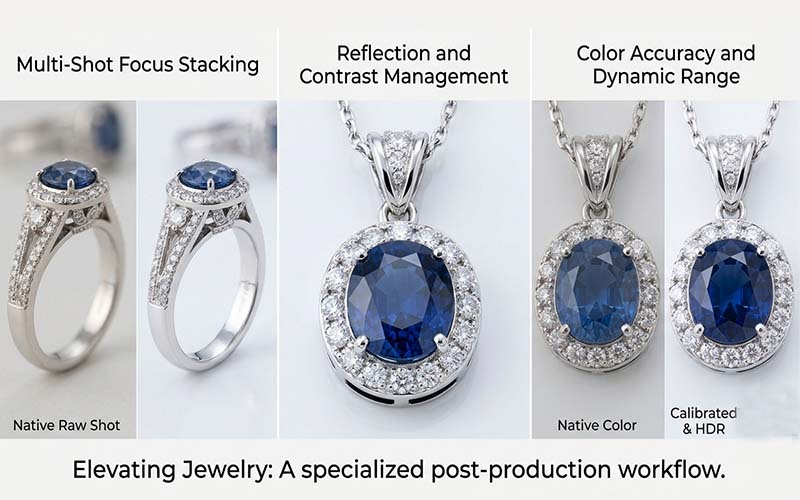
Metal and gemstones reflect their surroundings, so highlights and dark areas are part of how the object communicates shape. Removing every reflection can make a ring or necklace look flat. Over-brightening stones may hide their real color, while excessive sharpening can create harsh edges around tiny settings.
Jewelry also contains small areas where mistakes are easy to notice: prongs, chains, clasps, engraved marks, and the edges of stones. A retoucher must distinguish distracting marks from real product features. The aim is to remove temporary flaws from the photograph without erasing meaningful characteristics of the item.
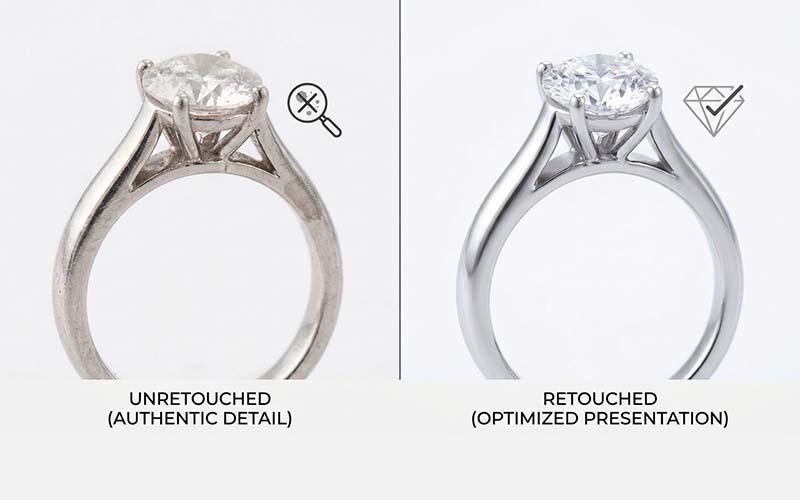
Dust, lint, fingerprints, and sensor spots can draw attention away from the jewelry. Careful cleanup can make the image feel more polished while retaining natural texture. The editor should work at sufficient magnification and compare the retouched result with the original to avoid removing real engraving, prongs, or surface details.
Not every mark should be removed automatically. A scratch that exists on the actual item, a natural inclusion in a gemstone, or a distinctive handmade detail may be relevant to an accurate representation. Businesses should set clear rules about what may be corrected and what must remain visible.
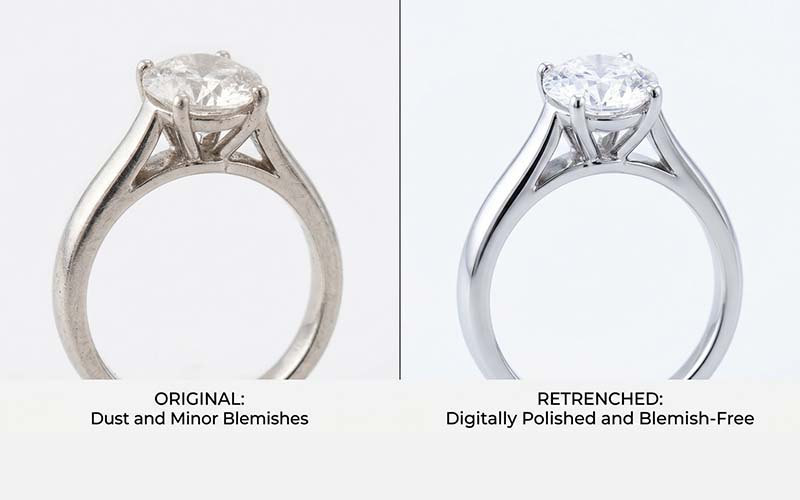
Gold, silver, platinum, and other finishes have different visual characteristics. Color correction should preserve those distinctions instead of pushing every metal toward the same bright tone. Highlights can be refined to improve clarity, but the final image should still look plausible under real lighting.
Gemstones require similar care. Color, cut, clarity, and internal reflections affect how a stone appears. Retouching can improve exposure and remove distracting photographic defects, but it should not invent facets, change a stone’s apparent color, or exaggerate characteristics that the product does not have. Accuracy supports customer trust and reduces the risk of misleading imagery.
Chains, prongs, open settings, and intricate earrings can be difficult to separate from a background. A rough cutout may leave halos or remove small parts of the item. Precise paths and masking techniques help preserve the shape and gaps around detailed jewelry.
Transparent stones and reflective surfaces can make separation more complicated because their appearance is influenced by the background. The editor should choose a suitable method for the image rather than applying a single technique to every object. Review the result on the intended background, since edge problems may appear only against certain colors.
Customers often compare multiple pieces on the same page. Differences in background tone, scale, crop, shadow, and brightness can make a catalog look uneven. A visual style guide helps keep product images aligned while allowing each item to retain its unique features.
Set rules for how much space the product occupies in the frame, how shadows should appear, and how white or neutral backgrounds should be handled. Review a group of products together, not only one image at a time. Consistency is especially useful for collections where customers compare similar rings, pendants, bracelets, or earrings.
Retouching works best when the original photograph is sharp, correctly focused, and captured with adequate detail. Clean the product before shooting, use stable support, control reflections, and capture enough resolution for the intended display size. Editing cannot reliably recover detail that was never recorded.
Provide the retoucher with reference images, product color information where relevant, output specifications, and rules for preserving product features. If images are intended for different channels, identify their required dimensions and crops. Clear inputs make it easier to achieve a consistent result without unnecessary changes.
Before the work begins, translate your expectations into instructions that can be followed consistently. State the objective, required output, technical specifications, and any details that must remain unchanged. Include representative examples and identify unusual images that may need special handling. A concise brief is more useful than a long request that leaves important decisions open to interpretation.
Ask the person completing the work to raise questions before processing a full batch. Confirm assumptions about edge treatment, color, crop, naming, file format, and revision rules. This small alignment step can prevent large amounts of rework and creates a reference that can be reused for future projects.
A frequent mistake is to focus on the finished image while overlooking the process that produces it. Unclear filenames, inconsistent source files, missing references, and late changes to the brief can cause errors even when the editing itself is strong. Establish a predictable way to submit files, communicate changes, approve samples, and receive final outputs.
Another mistake is to judge a provider or method using only one easy image. Include representative examples and assess the output as a group. Check both visual quality and delivery accuracy, and record issues in a way that makes them easy to correct. A consistent workflow makes problems easier to identify before they spread across an entire project.
Before approving delivery, check the image against the original brief. Confirm that the subject is intact, important details remain visible, the color and crop are appropriate, and there are no distracting edges or artifacts. Verify file dimensions, formats, naming, and the number of files received. A visual review and a technical file check catch different types of errors, so both should be part of the process.
Use the checklist proportionately. High-value, complex, or campaign-critical images may need a full review, while routine items can be reviewed through a consistent sampling process once the workflow is proven. If an error appears repeatedly, increase inspection and update the instructions until the issue is resolved.
Do not treat the first delivery as the only measure of success. Over several projects, track recurring corrections, turnaround reliability, communication quality, and the amount of internal time required to prepare or fix files. These observations provide a more realistic view of the process than a single successful example.
Use the results to make targeted improvements. If errors cluster around one image type, provide better reference material or adjust the technique. If files are frequently misplaced, revise the naming process. Regular, practical reviews help keep the workflow aligned with changing products, catalog size, and business priorities.
It may include dust cleanup, exposure and color correction, precise masking, background cleanup, and careful refinement of distracting photographic defects.
Color correction should aim for an accurate representation, not an invented or misleading gemstone color.
Intricate chains, prongs, and open settings can produce visible edge defects if they are separated from the background carelessly.
Some minor issues may be improved, but retouching cannot reliably restore detail that was not captured in focus.
Choosing the right approach to jewelry photo retouching starts with a clear understanding of your images, quality expectations, deadlines, and workflow. Define the result you need, use representative examples, and review the output against consistent standards. A practical process helps your team avoid preventable revisions and make better decisions as image volume grows. Revisit your workflow periodically so it continues to fit your products, customers, and business goals.
For jewelry catalogs that need careful masking or product retouching, review the relevant service options at ClippingImages.com and provide clear guidance about color accuracy and details that must be preserved.
Suggested filename: professional-jewelry-photo-retouching-clippingimages.jpg
Suggested alt text: Professional guidance about jewelry photo retouching for e-commerce and photography businesses.